
Wage Summaries: Review Working Hours, Pay, Bonuses and Tips
Preparing staff pay means bringing together working hours, pay arrangements, bonuses and tips. StrongInfo uses roster data to automatically summarise this information by week, fortnight or month, helping you review staff earnings in one place.
For massage shops and other service businesses, this reduces the need to manually combine roster information and pay figures for each reporting period.
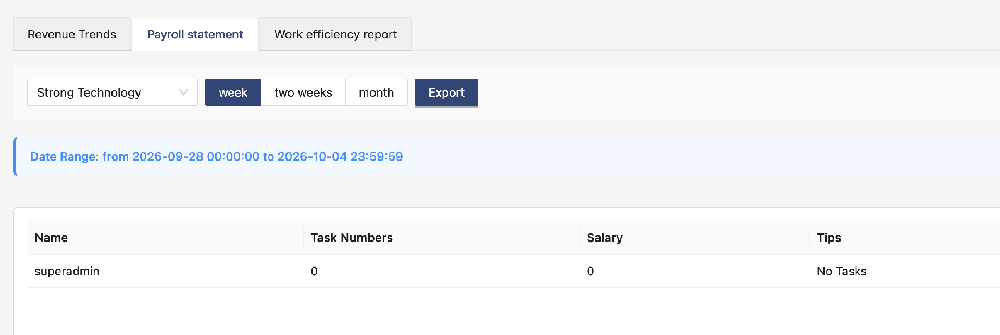
Choose a weekly, fortnightly or monthly summary
StrongInfo supports three reporting periods:
Weekly: Review one week at a time.
Fortnightly: Review a two-week period.
Monthly: Review a month at a time.
Choose the period that matches your business’s pay cycle. The system uses the roster results for that period to calculate each employee’s scheduled working hours and summarise their pay information.
Set up pay arrangements in User Information
Open the employee’s User Information to configure their pay arrangement, including base pay and any applicable commission settings.
Supported arrangements include:
Base pay: Calculate wages using the employee’s configured base-pay arrangement.
Base pay plus commission: Combine base pay with commission according to the configured rules.
Check these settings whenever an employee’s pay arrangement changes so that future calculations use the appropriate information.
Review hours, wages, bonuses and tips
For the selected reporting period, StrongInfo brings together:
Working hours calculated from the roster.
Wages calculated using the employee’s pay settings.
Recorded bonuses.
Recorded tips.
Reviewing these figures together makes it easier to check each employee’s earnings without collecting information from separate records manually.
For example, a shop using a fortnightly pay cycle can review two weeks of rostered hours alongside the employee’s wages, bonuses and tips before preparing payment.
Check the roster and recorded information
Working hours are calculated from the roster, so the accuracy of the summary depends on the underlying records.
Before finalising staff pay, check that:
Rostered times reflect the hours that should be included.
The employee’s pay and commission settings are current.
Bonuses and tips have been recorded correctly.
Any changes or adjustments have been reviewed.
If an employee works different hours from those originally planned, update the relevant roster information before relying on the calculation.
Export the summary
StrongInfo supports exporting wage summaries for further review and record keeping. After checking the reporting period and figures, export the results to keep a copy or support your existing pay administration process.
A simple workflow
Configure the employee’s pay arrangement in User Information.
Maintain accurate employee rosters and relevant bonus and tip records.
Choose a weekly, fortnightly or monthly reporting period.
Review the automatically calculated working hours and wage information.
Check bonuses, tips and any adjustments, then export the summary.
StrongInfo helps bring roster-based hours and staff earnings together in a repeatable process. Wage summaries support pay preparation; they do not by themselves confirm that payroll payments, tax reporting, superannuation or award interpretation are included.
Contact StrongInfo to discuss your pay cycle and see how wage summaries could fit your business.
Let’s talk about your working day.
Tell me about your bookings, team and daily tasks. We can explore a setup that fits your business.