
Employee Rotation and Daily Task Workflow for Service Businesses
In a massage clinic or beauty salon, the next task is not always assigned to the person who arrived first. Staff availability changes throughout the day as appointments or other tasks finish. A useful working view should show the day's team, the order for the next assignment and what each person is already doing.
StrongInfo Flow brings these details together in its task scheduling view. Select the store and working date first. The staff area shows the employees working that day, while the queue helps the team see whose turn is next based on the order in which previous tasks finish. The timeline then shows the tasks assigned to each employee.
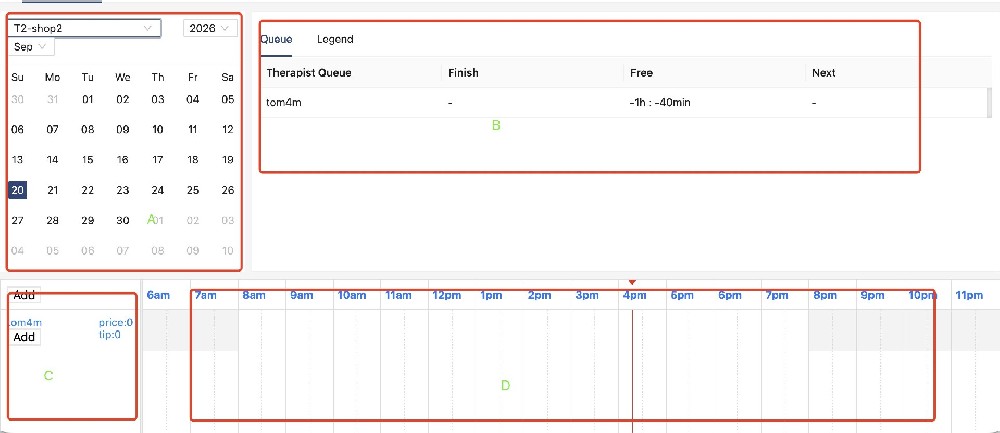
Consider a busy afternoon: two employees are finishing different services, and another task needs to be allocated. Before making the assignment, check the queue and the existing timeline. You can see the employee's current work and its time range instead of relying on memory or a separate handwritten list. Each task can carry the task name, start and end time, duration and price in the working view.
This does not replace a manager's judgement. Skills, customer preferences and breaks can still matter. The value of the shared screen is that everyone begins with the same current picture of the workday.
A simple daily routine
- Choose the correct store and date.
- Check which employees are on duty.
- Look at the rotation queue and current task end times.
- Review the assigned task before adding or changing work.
- Recheck the timeline as the day changes.
For a labelled walkthrough of the screen, read Task Scheduling: Plan, Assign and Track Daily Work. For the broader product, see StrongInfo Flow.
Let’s talk about your working day.
Tell me about your bookings, team and daily tasks. We can explore a setup that fits your business.