
From Weekly Staff Rosters to Wage Summaries
A roster and a pay summary answer different questions. The roster shows when someone is planned to work. The wage summary gathers the resulting hours and pay information for a selected period. Keeping the two connected can reduce the need to rebuild the same hours in a separate spreadsheet.
StrongInfo Flow's roster overview shows employees by store and week. Open an employee's shift-editing view to adjust the days and times they work. For a stable weekly pattern, the schedule can be set to copy automatically into future weeks. Managers should still review copied shifts when availability, leave or opening hours change.
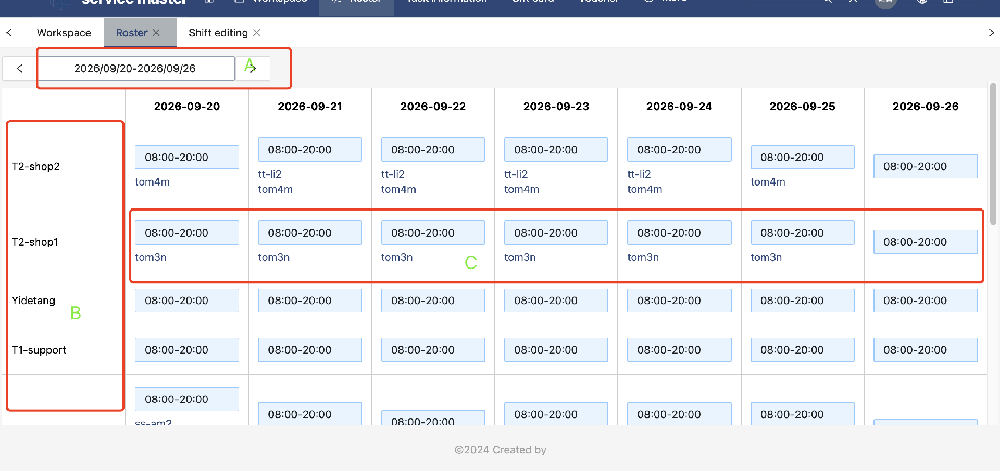
The wage summary uses roster data to calculate working hours and pay over a week, fortnight or month. The employee's pay arrangement is set in their user information. Flow supports arrangements such as a base wage or a base wage plus commission, and the summary can include bonuses and tips. Results can be exported for review.
A practical review process
- Confirm the correct store, week and employee shifts in the roster.
- Check changes to copied schedules before the pay period closes.
- Review each employee's pay arrangement in their user information.
- Generate the wage summary for the required week, fortnight or month.
- Check hours, pay, bonuses and tips against your records before export.
The exported summary is a review aid. Your business remains responsible for checking pay settings and meeting its payroll obligations. The key operational benefit is that the hours being reviewed come from the same roster your team used to plan the work.
See Employee Rostering: Organise Shifts and Staff Availability and Wage Summaries: Review Working Hours, Pay, Bonuses and Tips for screen-level detail. Learn more about StrongInfo Flow.
Let’s talk about your working day.
Tell me about your bookings, team and daily tasks. We can explore a setup that fits your business.